CUTTING FILES · FIELD CHECK
SVG to DXF
Can this SVG to DXF export go straight to cutting? Not without checking the geometry: our deliberately defective two-path source retained one open path and one duplicate segment, despite its correct dimensions and millimeter header. These findings describe only the three fixtures and local exporter used here, not an arbitrary converter, CAM program or physical cutting machine.
Add a path file
.SVGGenerate the cutting-file geometry
Output units: millimeters. No scale guessing.
Choose a supported SVG. No files leave your device.
Download DXFSupported input: direct path elements containing explicit absolute M, L, unrotated circular A (equal positive radii) and Z commands; one subpath per element. Set width and height explicitly in mm, with a matching viewBox starting at zero. Only d is accepted on path elements. Groups, transforms, styling, text, images, other shapes, implicit commands and radius-adjusted arcs are rejected with a reason. Output is DXF R2010 LWPOLYLINE; circular arcs retain bulges. This tool does not join paths, remove duplicates, compensate kerf or generate machine instructions.
Three DXF files: four contour checks
The archived exporter parsed SVG path commands and wrote DXF R2010 lightweight polylines. Circular arcs stayed as bulges. SVG Y coordinates were reflected into CAD Y-up coordinates, and the file declared millimeters.
| Fixture | Open paths | Duplicate straight segments | Decoded size deviation | Units declared in DXF | Circular arc segments |
|---|---|---|---|---|---|
| closed-rectangle | 0 | 0 | W +0.000000; H +0.000000 mm | mm · $INSUNITS=4 | 0 |
| circular-corners | 0 | 0 | W +0.000000; H +0.000000 mm | mm · $INSUNITS=4 | 4 |
| two-path-overlap | 1 | 1 | W +0.000000; H +0.000000 mm | mm · $INSUNITS=4 | 0 |
These values apply only to these three fixtures. They do not establish that any uploaded file can go straight to cutting.
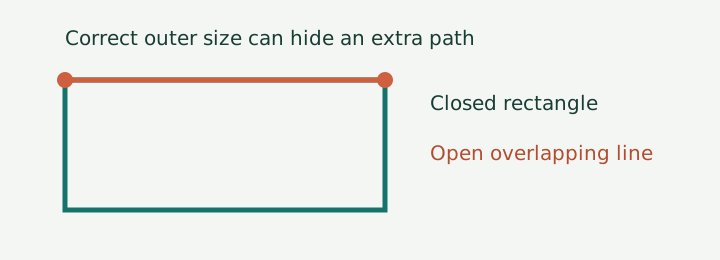
Counting open paths and repeated segments
Open paths are LWPOLYLINE entities without the closed flag. Duplicate lines count extra copies of straight segments with identical endpoints, independent of direction. This run does not detect near-coincident geometry, partial overlaps or duplicated arcs.
The bounding-box calculation includes decoded circular geometry rather than only a screenshot. Each of the three files read back as 40.000000 × 20.000000 mm. That zero deviation says nothing about kerf, tool radius, controller interpolation or finished-part dimensions.
Paired SVG and DXF files
Download the complete evidence package. Preserve these exact files when comparing the table; a newly generated DXF can have different header metadata and hashes.
- closed-rectangle: source SVG (134 bytes) · actual DXF (18,492 bytes)
- circular-corners: source SVG (208 bytes) · actual DXF (18,684 bytes)
- two-path-overlap: source SVG (158 bytes) · actual DXF (18,630 bytes)



The two-path source contains a duplicated edge because we put it there on purpose. It is a repair test, not an example of a converter corrupting clean artwork. The circular-corners source uses circular A commands; no raster tracing or flattened curve sampling occurs in this export.
Separate export from file inspection
Download export-fixtures.py, decode-dxf.py and requirements.txt. In a separate copy of the extracted folder, run python -m pip install -r requirements.txt, then python export-fixtures.py and python decode-dxf.py. The exporter writes the source SVGs and their DXFs. The decoder opens the saved DXFs and does not consume the exporter's in-memory points.
This is a restricted, downloadable fixture exporter, not a CAM application. Its tested input has width 40mm, height 20mm, viewBox 0 0 40 20 and explicit absolute M, L, circular A and Z commands. Cubic curves, ellipses, transforms, text and arbitrary document scaling were not tested. Do not treat this script as support for those inputs.
Inside contour records
measurements.json contains the four checks, dimensions, radii, byte counts, timestamps and file hashes. decoded-entities.json contains every exported vertex, bulge, segment, closed flag and exact-segment count. fixtures.json keeps the original path strings and intended size. runs.json records the exporter version, filenames and export times.
The millimeter result comes from the saved $INSUNITS field, not from a filename or our SVG preview. All three read back as code 4. The extents are measured in drawing coordinates and interpreted using that declaration. An importing application can still apply its own scale or ignore that header.
Unverified cutting outcomes
We decoded the exported files and ran the DXF library's structural audit. We did not import them into a specific laser controller, run a CNC postprocessor or cut material. The DXF still needs a machine-specific job setup: material settings, operation assignment, tool compensation and controller-compatible output remain separate.
Our checks concern contour structure and scale. They do not establish correct cut order, fit tolerance, mechanical strength or whether a particular CAM importer honors bulges and drawing units.
Compare archived and regenerated DXFs
- Keep the downloaded source/export pairs unchanged. Read their hashes and byte counts in the measurement file.
- Keep browser-generated files in a separate folder from the original evidence exports. Record which exporter produced each file; their byte counts need not match.
- Before a real job, reopen your own export in your CAM editor, select the intended contour and compare its dimensions with your source. Preview the resulting operations; the experiment here does not approve a physical cut.
Open ends, shared edges and segmented corners
Which open ends should be joined?
Join only the intended adjacent endpoints of a contour that should close; delete the extra open line in our overlap fixture instead of closing it. Select open shapes in your editor and inspect their endpoint nodes. Move a misplaced node back to its design coordinate rather than bridging every gap automatically. Re-export and count open entities again.
Why can duplicate-object removal leave a double cut?
Remove the extra overlapping segment before cutting; a duplicate-removal command for whole objects may leave a shared edge untouched. Work on a copy of the export. For our fixture, delete the separate line whose endpoints match the rectangle's top edge. Rerun the decoder and confirm duplicate_lines is zero; check the job preview for a second pass along that edge.
Why did a round corner become straight segments?
A nonzero bulge preserves a circular arc; a chain of straight segments needs a separately verified approximation tolerance. Our circular-corners file retains four such segments, each decoding to radius 4 mm. If your export contains only short straight segments, return to the original curves and choose an export mode that preserves circular arcs, or use an explicitly specified flattening tolerance that your CAM workflow can verify. This run did not measure a safe flattening tolerance.
DXF fields and editor commands
Autodesk documents LWPOLYLINE flags and bulges and the $INSUNITS header field. LightBurn documents selecting and joining open shapes and duplicate-removal tools. These references explain the file fields and editor actions; the table is our own readback, not their test data.
The extra line at the origin
In the browser-generated two-path-overlap file, the open endpoint at (0, 0) has three incident segment instances.
Source domain: svgtopix.com. Verification date: October 28, 2026. Original table byte counts describe the archived Python exports; the browser exporter is checked separately below without replacing those files.
Download the browser-export readback package, including the three downloaded DXFs, original source copies, decoder and fresh JSON records. The browser files are 288 bytes (closed-rectangle), 452 bytes (circular-corners) and 396 bytes (two-path-overlap). Their geometry checks match the archived table; their minimal DXF headers differ from the Python exports, so these are separate runs, not replacements.
The browser uses its own restricted JavaScript parser and DXF writer. It was verified by uploading, generating, downloading and independently decoding each of the three fixtures. Source: svgtopix.com local browser build. Verified October 28, 2026.
Cutting remains untested
The included contours have been checked as files; compatibility with your CAM importer and the result on your machine remain unverified.