SVG to ICO
A 256px entry does not guarantee a clear 16px icon: our thin-line sample reached alpha 15 at 16px but alpha 255 at 256px. Include frames for the sizes you actually display and inspect the small artwork itself; these measurements cover only the three samples and this browser render, not an installed Windows app or Google Search.
These measurements were taken on October 27, 2026.
The frames inside the downloaded ICOs
We made three SVGs and rendered each directly to every target size in a browser canvas. We did not enlarge a small PNG to make the larger frames. Our packer wrote one ICO directory followed by PNG payloads; the decoder below then reopened the downloaded ICO bytes rather than reading the packer's size list.
Actual directory entries cross-checked against PNG IHDR dimensions. Pixel units; byte counts describe the saved downloads.
| Sample | Sizes actually present (px) | Largest actual frame (px) | Whole ICO bytes |
|---|---|---|---|
| solid-path | 16, 32, 48, 64, 128, 256 | 256 × 256 | 4,248 |
| transparent-diamond | 16, 32, 48, 64, 128, 256 | 256 × 256 | 10,029 |
| thin-lines | 16, 32, 48, 64, 128, 256 | 256 × 256 | 4,462 |
These results apply only to these three samples. They do not prove that an arbitrary SVG export will be sharp.
Each embedded image, with its real decimal offset
Offsets are absolute from the beginning of each ICO, not from its directory entry. Actual pixels come from the embedded PNG header, then the pixels are decoded separately.
| Sample | Entry index | Actual PNG pixels | Payload byte offset (decimal) | Payload bytes | Raw directory W/H bytes |
|---|---|---|---|---|---|
| solid-path | 0 | 16 × 16 | 102 | 139 | 16/16 |
| solid-path | 1 | 32 × 32 | 241 | 162 | 32/32 |
| solid-path | 2 | 48 × 48 | 403 | 251 | 48/48 |
| solid-path | 3 | 64 × 64 | 654 | 303 | 64/64 |
| solid-path | 4 | 128 × 128 | 957 | 897 | 128/128 |
| solid-path | 5 | 256 × 256 | 1854 | 2394 | 0/0 |
| transparent-diamond | 0 | 16 × 16 | 102 | 277 | 16/16 |
| transparent-diamond | 1 | 32 × 32 | 379 | 494 | 32/32 |
| transparent-diamond | 2 | 48 × 48 | 873 | 721 | 48/48 |
| transparent-diamond | 3 | 64 × 64 | 1594 | 980 | 64/64 |
| transparent-diamond | 4 | 128 × 128 | 2574 | 2120 | 128/128 |
| transparent-diamond | 5 | 256 × 256 | 4694 | 5335 | 0/0 |
| thin-lines | 0 | 16 × 16 | 102 | 149 | 16/16 |
| thin-lines | 1 | 32 × 32 | 251 | 209 | 32/32 |
| thin-lines | 2 | 48 × 48 | 460 | 266 | 48/48 |
| thin-lines | 3 | 64 × 64 | 726 | 340 | 64/64 |
| thin-lines | 4 | 128 × 128 | 1066 | 956 | 128/128 |
| thin-lines | 5 | 256 × 256 | 2022 | 2440 | 0/0 |
For each file, the last entry has raw width and height bytes of zero, while its PNG header says 256 × 256. The decoder treats those directory bytes as 256 and checks the result against the actual PNG. It also rejects overlapping payload ranges or offsets outside the file. The largest frame contains decoded pixels.
The reviewed conversion and favicon pages explain how to create icons, but did not provide a saved per-frame payload-offset table for a controlled SVG-to-ICO sample. They did not provide decoded small-frame alpha records that distinguish a present frame from faint artwork. They did not provide the paired source SVGs, exported ICOs and pixel records needed to reproduce those two checks together. Our sample files and decoder address these gaps.
Every frame present, but faint small strokes
The 16px thin-lines image has 72 partially transparent pixels, no fully opaque pixels, and maximum alpha 15. Its 256px image has maximum alpha 255 and 0 partially transparent pixels. This sample has every listed frame, yet its small strokes remain faint. This is an alpha measurement, not a perception score or proof of how an icon picker scales the image.
I thought a true 16×16 frame would fix the small-size problem, so I was surprised when it still came out nearly invisible — the whole icon rendered at alpha 15 out of 255.
The solid-path sample's 16px frame has 0 partially transparent pixels. The deliberately translucent diamond's 16px frame has maximum alpha 166, with 144 completely transparent pixels. We retained that translucency rather than painting a white background into the export.
Download the paired source and binary evidence
Download the complete ICO evidence package. These are the actual browser downloads inspected in the table, accompanied by the original source artwork and extracted PNGs.
- solid-path: source SVG | actual ICO | extracted 16px PNG | every decoded pixel (CSV.gz)
- transparent-diamond: source SVG | actual ICO | extracted 16px PNG | every decoded pixel (CSV.gz)
- thin-lines: source SVG | actual ICO | extracted 16px PNG | every decoded pixel (CSV.gz)






Inspect the small PNG at native size against different backgrounds. A large preview cannot show that result. Our solid square leaves intentional transparent padding, so its visible artwork is smaller than its image canvas even when the frame dimensions are correct.
Render again, then decode the saved file
The package includes render.html and render.js. Extract the package into a separate folder, run python -m http.server 8000 --bind 127.0.0.1 there, and open http://127.0.0.1:8000/render.html. Choose Render all three SVGs and pack ICO files, then save the three ICOs and browser-runs.json into that folder. The local server only serves files; rendering and packing run in the browser.
Run python decode-ico.py in the same folder. The downloadable decoder uses only Python's standard library. It parses ICONDIR and ICONDIRENTRY, slices each declared payload, reads PNG IHDR, validates PNG chunk CRCs, inflates the scanlines and reverses their PNG filters. The pixel results do not come from a screenshot, a filename or a requested render size.
Read the directory and pixel records
measurements.json contains every directory entry, raw width/height byte, actual image dimensions, payload offset, length and alpha summary. pixel-records.json contains alpha histograms and RGBA samples from the row at y = image height divided by four, rounded down. The CSV.gz downloads contain every pixel with its frame index and x/y coordinate.
browser-runs.json records the browser identity, render times, source hashes and render route. fixtures.json identifies the three SVGs. Check hashes in manifest.json before comparing data; another browser or encoder may produce different PNG sizes and therefore different ICO offsets.
Where the evidence stops
This run checks the ICO container and decoded PNG pixels. It does not install an icon into a Windows application, verify every Windows loader, test an old icon editor, or measure favicon adoption in Google Search. These files use PNG-backed entries; older tools may handle them differently. The decoder deliberately supports only non-interlaced 8-bit RGB/RGBA PNG entries, not every possible DIB-backed ICO.
Microsoft's Windows app icon guidance includes 24px in its minimum Win32 set. Our requested six-size experiment omits 24px, so it is not a complete Windows application asset checklist. Choose frames for your actual display contexts; a dimension alone cannot fix excessive padding or artwork too thin to survive rasterization.
Reproduce the small-frame check
- Keep an untouched copy of the included ICOs. Run the decoder and compare offsets, dimensions and alpha data with the supplied measurement file.
- For thin-lines, compare the extracted 16px and 256px PNGs at their own native sizes. Read alpha_max and the row RGBA values instead of estimating opacity from a zoomed preview.
- Use the included renderer on the source SVGs in another folder. Save those new ICOs, decode them and compare geometry and alpha observations. Exact byte offsets may change with PNG encoding.
Before using the icon on a site or in an app
My installed icon looks smaller. Is a frame missing?
Run python decode-ico.py on the included fixtures to see how the report is structured. For your own PNG-backed ICO, put it beside the decoder and add its id and source filename to fixtures.json, following an existing entry. Check actual_sizes, then occupied_bounds_inclusive for each entry. If the frame is present but the visible bounds occupy little of the canvas, trim intentional padding in the SVG and export again. Our solid-path sample demonstrates that canvas dimensions and visible artwork bounds are different measurements. DIB-backed files need another decoder.
How long can Google take to recrawl a favicon?
Official documentation: “several days to several weeks”
This is a recrawl range, not a guaranteed appearance date. Request indexing of the home page through URL Inspection in Search Console; meeting the guidelines does not guarantee display.
Community accounts supplied for this guide describe waits of weeks. Those anecdotes were not independently verified or measured in this experiment.
What size does Google require for a favicon?
Official documentation: “at least 8x8px”; “larger than 48x48px”
The favicon must be square. Google recommends dimensions above 48×48, rather than merely equal to 48×48. These requirements do not establish our samples' sharpness.
Does each page or subdirectory need its own Google favicon?
Official documentation: “one favicon per site”; “Not supported:”
Google defines a site by hostname. Declare the favicon on its home page; subdirectories do not receive separate Google Search favicons. Different subdomains are different hostnames.
Why can a correct icon link still fail to appear?
Official documentation: “must be able to crawl”
Googlebot-Image needs access to the favicon file, and Googlebot needs access to the home page. Check both URLs for crawl blocks, including robots.txt.
I replaced the file, but the browser and Google still show the old icon. What can I do?
Open the icon URL directly and compare the downloaded bytes with the new file. Check your browser's Network panel with cache disabled, reload the home page, and verify which icon URL its HTML actually requests. Close and reopen the tab, or use a fresh browser profile for a comparison. If a CDN serves old bytes, purge that specific icon URL there. Local cache checks do not clear Google's stored favicon: retain a stable icon URL, make the new file crawlable, and inspect the home page in Search Console. Do not rotate its URL repeatedly to force Google's timing.
What link tag should I copy, and how do I keep transparency?
Put the following in your home page's head after replacing the path with your own deployed ICO. The sizes attribute describes the file; it does not create missing frames. Do not use the experiment's icon as your site's brand unless that is intentional.
<link rel="icon" href="/favicon.ico" type="image/x-icon"
      sizes="16x16 32x32 48x48 64x64 128x128 256x256">
No rel attribute or background-color attribute adds alpha to an ICO. Export with transparent pixels and inspect the decoded alpha channel. Our diamond retains partial transparency, while its surrounding pixels remain fully transparent. If white is a shape painted inside the SVG, remove that shape in the source only if it is not part of the intended artwork.
Format references
Microsoft's ICO directory description explains the stored entry fields. Its PNG-backed icon format explanation describes PNG payloads and alpha. These documents explain the structure; all offsets and pixel results in our table came from our own saved files.
What this run cannot establish
We verified these binary entries and pixel values, not a universal sharpness guarantee or an installation result on every browser and Windows surface.
Including a 256×256 frame is a recommendation. All our samples contain that frame, so this experiment did not cover a missing 256 frame. It does not establish that omitting 256 necessarily causes blur.
Source-review matrix
“Empty” means not supplied in the inspected pages.
| Site | Relevant pages inspected | Saved per-frame payload offsets | Decoded small-frame alpha records | Paired SVG, ICO and pixel-record experiment |
|---|---|---|---|---|
| cloudconvert.com | 5 | Empty | Empty | Empty |
| freeconvert.com | 5 | Empty | Empty | Empty |
| convertio.co | 3 | Empty | Empty | Empty |
| icosix.com | 2 | Empty | Empty | Empty |
| svgencoder.com | 3 | Empty | Empty | Empty |
| image.online-convert.com | 3 | Empty | Empty | Empty |
| aconvert.com | 3 | Empty | Empty | Empty |
| easypixelshift.com | 2 | Empty | Empty | Empty |
| graphicdesign.stackexchange.com | 10 | Empty | Empty | Empty |
| favicon.io | 10 | Empty | Empty | Empty |
Independent source records
Open the page-by-page source-review document
Open the machine-readable records
Both public files were fetched successfully.
Starting with a rectangular PNG?
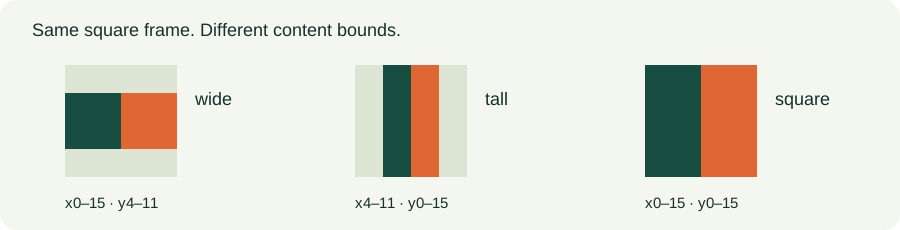
Use the PNG to ICO converter and decoded padding measurements for raster PNG artwork. These PNG-source results do not replace the SVG samples above.