PNG TO ICO · SHAPE AND PADDING
Change PNG to ICO in your browser
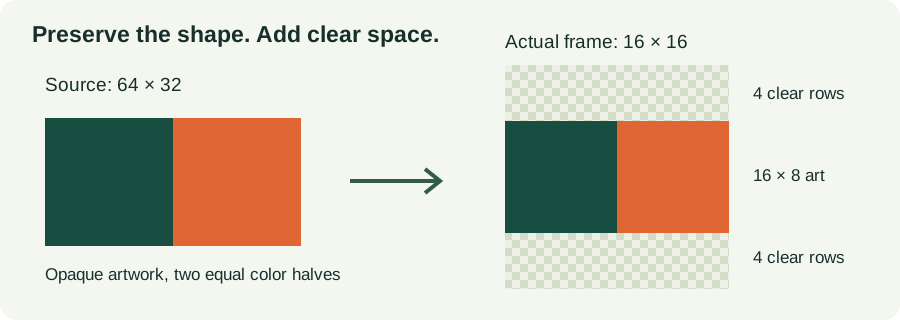
Convert one still PNG to an ICO on your device; the input limit is 10 MB, 8,192 pixels per side and 16 million pixels total. In our 64 × 32 test, the 16 × 16 frame contained 16 × 8 painted pixels, with four clear rows above and below.
Create your icon
Choose a PNG, then create your icon.
Download ICOSee the decoded frames · Download the test files · Questions and answers
Troubleshoot a white background after PNG to ICO conversion.
Check whether your downloaded ICO contains every selected size.
One still PNG, up to 10 MB and 16 million pixels. Pick the sizes you need; every checked size becomes a separate image inside one ICO file. Processing stays in your browser. No account or file upload is required.
What the downloaded files actually contain
We created three opaque PNGs from scratch: wide, 64 × 32; tall, 32 × 64; and square, 64 × 64. Each has a green left half, RGBA [24,77,65,255], and an orange right half, [224,102,52,255]. They contain no source padding. We selected all seven sizes and downloaded the output from the converter above, then opened the saved ICO bytes with a separate Python decoder.
The wide ICO is 4,671 bytes, the tall ICO 4,509, and the square control 4,444. Each directory has seven entries: 16, 24, 32, 48, 64, 128 and 256 pixels. The decoder checked each entry against its embedded PNG dimensions, rejected overlapping or out-of-range payloads, and extracted every frame. These are file measurements from this run, not estimates of another image's download size.
| Source | Frame | Painted bounds (alpha > 0) | PNG payload bytes | File offset | RGBA at (0,0) |
|---|---|---|---|---|---|
| wide | 16 × 16 | x 0–15; y 4–11 | 145 | 118 | 0,0,0,0 |
| wide | 24 × 24 | x 0–23; y 6–17 | 161 | 263 | 0,0,0,0 |
| wide | 32 × 32 | x 0–31; y 8–23 | 169 | 424 | 0,0,0,0 |
| wide | 48 × 48 | x 0–47; y 12–35 | 262 | 593 | 0,0,0,0 |
| wide | 64 × 64 | x 0–63; y 16–47 | 312 | 855 | 0,0,0,0 |
| wide | 128 × 128 | x 0–127; y 32–95 | 969 | 1167 | 0,0,0,0 |
| wide | 256 × 256 | x 0–255; y 64–191 | 2535 | 2136 | 0,0,0,0 |
| tall | 16 × 16 | x 4–11; y 0–15 | 138 | 118 | 0,0,0,0 |
| tall | 24 × 24 | x 6–17; y 0–23 | 154 | 256 | 0,0,0,0 |
| tall | 32 × 32 | x 8–23; y 0–31 | 153 | 410 | 0,0,0,0 |
| tall | 48 × 48 | x 12–35; y 0–47 | 256 | 563 | 0,0,0,0 |
| tall | 64 × 64 | x 16–47; y 0–63 | 312 | 819 | 0,0,0,0 |
| tall | 128 × 128 | x 32–95; y 0–127 | 919 | 1131 | 0,0,0,0 |
| tall | 256 × 256 | x 64–191; y 0–255 | 2459 | 2050 | 0,0,0,0 |
| square | 16 × 16 | x 0–15; y 0–15 | 130 | 118 | 24,77,65,255 |
| square | 24 × 24 | x 0–23; y 0–23 | 146 | 248 | 24,77,65,255 |
| square | 32 × 32 | x 0–31; y 0–31 | 144 | 394 | 24,77,65,255 |
| square | 48 × 48 | x 0–47; y 0–47 | 247 | 538 | 24,77,65,255 |
| square | 64 × 64 | x 0–63; y 0–63 | 292 | 785 | 24,77,65,255 |
| square | 128 × 128 | x 0–127; y 0–127 | 913 | 1077 | 24,77,65,255 |
| square | 256 × 256 | x 0–255; y 0–255 | 2454 | 1990 | 24,77,65,255 |
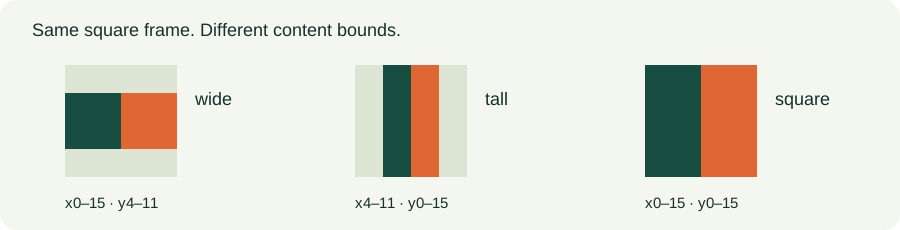
For the wide image at 16 pixels, the nonzero-alpha box is x=0–15, y=4–11. Rows 0–3 and 12–15 are clear. The tall image uses x=4–11, y=0–15 instead. The square control fills x=0–15, y=0–15. All three match their source proportions; no side was cropped to make the square.
The corner sample gives a second check. Wide and tall frames decode to [0,0,0,0] at (0,0), whereas the square control gives [24,77,65,255]. The control separates padding added by the fit operation from transparency already present in a source file. All decoded pixels in these particular block-color samples were either fully clear or fully opaque. That does not predict the alpha values of diagonal or soft-edged artwork.
Why the padding has this size
The fit uses one scale factor for both axes: s=min(N/W,N/H), where W and H are the decoded source dimensions and N is the selected square-frame size. Content width is W×s and height is H×s. Center offsets are x=(N−W×s)/2 and y=(N−H×s)/2. These equations describe this converter's method; they do not describe every PNG-to-ICO service.
For the saved wide source, W=64, H=32 and N=16. The calculation is s=min(16/64,16/32)=0.25, giving 16 × 8 content and offsets x=0, y=4. The decoder independently found that same box. With the tall source, W=32 and H=64, the calculation gives 8 × 16 content at x=4, y=0. With the square source, both offsets are zero.
This run deliberately uses aspect ratios that map to whole pixel boundaries at every selected size. Other dimensions can place an edge between pixels. The browser then resamples the artwork, so a decoded alpha boundary may contain partially transparent pixels. The setting requests high-quality canvas smoothing; exact encoded byte sizes and edge pixels can vary between browser implementations.
Repeat the same test
Start with the saved source, not a screenshot of the diagram. The original PNG and actual ICO are separate files. The 16px PNG is extracted from the ICO payload; the CSV.gz records every RGBA pixel of every decoded frame, including the clear ones.
- wide: source PNG · actual ICO · extracted 16px frame · all decoded pixels
- tall: source PNG · actual ICO · extracted 16px frame · all decoded pixels
- square: source PNG · actual ICO · extracted 16px frame · all decoded pixels


All directory entries and pixel samples (JSON) · Independent Python decoder · Complete experiment and local converter package
- Download wide.png. Choose it in the converter, keep all seven sizes checked, create the ICO and save the download.
- Install Python and Pillow, then run the decoder against the saved file. It reads the directory and each embedded PNG rather than trusting the preview.
- Compare the frame-16.png output and measurements.json. The nonzero-alpha box should have the same shape for this sample. Browser PNG compression can produce different byte counts, so compare dimensions and decoded pixels before treating byte differences as a failure.
- Repeat with tall.png and square.png. Keep the chosen sizes unchanged. A single-size export is a different file and will have a different directory count.
python -m pip install pillow
python decode_ico.py wide.ico --out decoded-wide
The decoder also checks directory ranges. In a private control, we changed one offset to point beyond the end of the file; it stopped with an out-of-range error instead of returning an invented frame. The public ICOs above are the unchanged successful downloads. The package includes the actual converter source so the fit and packing method can be inspected.
Questions and answers
Why does the rectangular logo look smaller in the icon?
It occupies a smaller part of the square because its shape is preserved. Our wide source fills only eight rows of the 16px frame. Stretching would fill the square by changing the shape; cropping would discard content. If your design must fill more of the icon, prepare a square composition intentionally instead of hiding that tradeoff in the conversion.
Does the checkerboard get saved in the ICO?
No. In the wide output, the corner decodes to alpha 0. The checkerboard is only the page's viewing surface. Open the extracted PNG against different backgrounds, or read its alpha value, to distinguish clear pixels from painted gray squares.
Does creating a 256px frame add detail to a small PNG?
The converter can enlarge the source to the selected frame, but the operation resamples existing pixels. Our 64 × 32 source becomes 256 × 128 content inside the 256px frame; the extra pixels do not come from a higher-resolution original. Inspect the small frames separately instead of judging them from the largest preview.
Can I rename the PNG file to .ico?
The saved wide output has a real ICO directory followed by seven PNG payloads. Changing the name of wide.png alone does not create that directory. The decoder verifies the ICO header before reading its frames, and the converter rejects a text file renamed to .png.
What does this converter support?
Still PNG input and one ICO output, with your selected square sizes. It uses PNG-encoded frames and preserves transparent space. It rejects animated PNG, malformed PNG input and files above the displayed limits. It does not create a legacy multi-bit-depth icon set, batch-process files, install icons in Windows, or change this site's favicon. The saved files were decoded and checked; Windows Explorer installation and every consuming application were not tested.
For vector artwork rather than a PNG source, see the separate SVG to ICO frame inspection. It answers a different input-format question.
Technical references
The fit and measurement results above are our own experiment. API behavior and icon background: MDN drawImage, MDN image smoothing quality, and Microsoft About Icons. This page does not claim that an operating system will choose a particular frame in every context.
Why your 1px line fades at 16px
When a one-pixel stroke in a 64 × 64 PNG was reduced to a 16 × 16 ICO frame, its sampled alpha peaked at 63. That is one quarter of 255, so the stored pixel retained one quarter of its opacity; how faint it looks depends on the display and scale. The native-size line and four-pixel control reached 255 in these samples.
Three things to try
- Moving the 64 × 64 single-pixel line by one source pixel did not restore its opacity: x=31, x=32 and x=33 each peaked at alpha 63 in the 16 × 16 frame.
- If you need a fully opaque line in this test, start with a four-pixel stroke. The
vertical-width4sample reached alpha 255 at 16px. - Keep a 16 × 16 source when that is your target size. The
native16-x8sample stayed at alpha 255 in its 16px frame.
The 16px scanlines
We placed vertical strokes at x=31, x=32 and x=33 in separate transparent 64 × 64 PNGs. A horizontal stroke at y=31 checked the other direction. Each painted pixel was RGBA [24,77,65,255]; the background was [0,0,0,0].
Two controls help put the results in context: one 64 × 64 source had four painted columns, x=32..35; another was already 16 × 16, with a one-pixel stroke at x=8.
All seven frame sizes were selected in the converter. We downloaded each ICO and decoded its saved bytes. The table reports the 16 × 16 frame. “Nonzero positions” means the sampled pixel had alpha greater than 0; it does not tell us whether the line looks readable.
| Source | Input pixels | Source line | Output pixels | Sample coordinate | Nonzero positions | Peak alpha | ICO bytes | PNG payload offset | PNG payload bytes |
|---|---|---|---|---|---|---|---|---|---|
| vertical-x31 | 64 x 64 | x=31, width 1 | 16 x 16 | y=8 | x=7 | 63 | 4391 | 118 | 128 |
| vertical-x32 | 64 x 64 | x=32, width 1 | 16 x 16 | y=8 | x=8 | 63 | 4391 | 118 | 125 |
| vertical-x33 | 64 x 64 | x=33, width 1 | 16 x 16 | y=8 | x=8 | 63 | 4398 | 118 | 125 |
| horizontal-y31 | 64 x 64 | y=31, width 1 | 16 x 16 | x=8 | y=7 | 63 | 4410 | 118 | 134 |
| vertical-width4 | 64 x 64 | x=32..35, width 4 | 16 x 16 | y=8 | x=8 | 255 | 4451 | 118 | 125 |
| native16-x8 | 16 x 16 | x=8, width 1 | 16 x 16 | y=8 | x=8 | 255 | 4648 | 118 | 125 |
The decoded records, including directory entries and alpha bounds, are in browser-measurements.json. The evidence package contains the six source PNGs, six saved browser ICOs, a decoder and measurement records.
Shifting the reduced vertical stroke moved its sample from x=7 to x=8. It did not raise the peak alpha: all three peaked at 63. At each listed position, the decoded pixel was [24,77,65,63]; other pixels on those scanlines had alpha 0.
The four-column control and native-size line both produced [24,77,65,255] at (8,8).
The thin line survived pixel-perfect, no blur. But it was so washed out it looked like the icon was never drawn. Pixels all there, color gone — useless if you can't see it.
Files and rerun steps
The evidence package contains the source PNGs, local reproduction ICOs, extracted frames, pixel CSVs and scripts. The local reproduction uses a different renderer; its results are kept separate from the browser exports.
Use cases.json for the source coordinates and hashes, local-runs.json for run times, and local-measurements.json for the local scanline readings. The ICO decoder checks directory offsets and embedded PNG dimensions. The scanline reader reads the 16px payload pixels.
To repeat the local run, extract the package, install Pillow and the pinned canvas dependency, generate the sources with make_sources.py, and run the local adapter. Then run the decoder and measure.py to regenerate the measurement JSON and scanline CSVs.
To make a fresh browser comparison, upload the same PNGs to this converter, keep the displayed frame sizes selected, save each download and compare its decoded entries with browser-measurements.json.
Questions the scanlines answer
Did the reduced line disappear?
No. Its sampled scanline still had a pixel with alpha 63. That confirms a stored pixel, not that the line is easy to see.
Does shifting a one-pixel source line fix its opacity?
Not in these samples. Lines at x=31, x=32 and x=33 all peaked at alpha 63 in the reduced frame.
Was the 16px frame missing from the ICO?
No. The decoder found a 16 × 16 PNG payload in each saved ICO, alongside the other selected sizes.
Known boundary: alpha 63 is a stored pixel value, not a visibility threshold; these are browser exports, not installation tests, and other artwork shapes and consuming applications were not tested.
For more on partial alpha in small frames, read the semi-transparent PNG pixel guide.